v1.2.0 Released: Focus Layouts, Per-Video Marks & Faster Multi-Video Setup!

Evolve Your Racing Skills

SyncA (pronounced "Shinka", meaning Evolution) is a powerful, free multi-video comparison tool. Synchronize up to 10 videos frame-by-frame, automatically calculate segment times, and compare your driving lines with rivals.

v1.2.0 makes comparison work easier when you add videos later: record Start, Goal, and segment points per video, focus only on the videos you need, and set up multiple dropped videos automatically.

Windows 10/11 (64bit) Only
The application automatically displays in Japanese when used in a Japanese OS environment, and switches to English for all other environments.
"Download the latest version here" link added directly inside the App!
New in v1.2.0: per-video point recording, compact Start/Jump/Goal controls, video tab minimization, and automatic setup for multiple dropped videos.
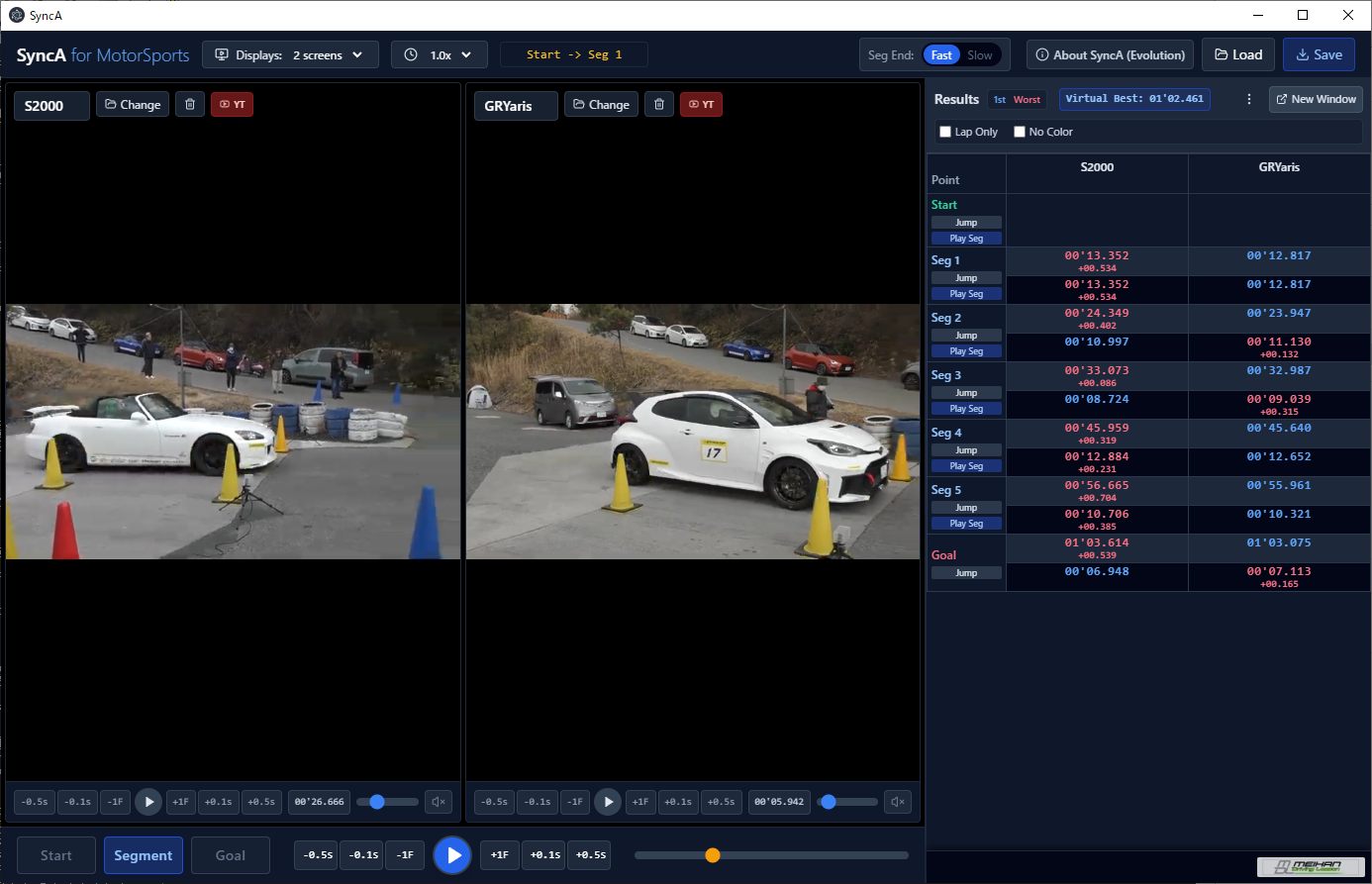
SyncA Application Screenshot
New in v1.2.0

Built for cleaner comparison with more videos

Version 1.2.0 focuses on the real review workflow: add footage after segmentation, keep only the necessary videos large, and jump or replay each segment with fewer controls on screen.

Per-Video Point Entry

Add a new video after Start, Goal, and segment points already exist, then record or update those points individually for that video.

Focused Compare View

Collapse the timing panel to a compact Start, Jump, and Goal control strip so the video area can stay as large as possible.

Minimize Video Tabs

Temporarily minimize videos you do not need into name tabs at the bottom. Restore a tab any time and the remaining videos resize automatically.

Batch Drop Setup

Drop multiple videos at once. SyncA automatically prepares the matching number of video panes and starts conversion when a file needs it.

YouTube Integration

Directly load YouTube URLs alongside local videos. Synchronize and compare them seamlessly. Now supports start time parameters (e.g., ?t=1m30s).
v1.1.9 adds a paste button and right-click paste support for the YouTube URL field. * Will magically stop working if YouTube sneezes and changes their specs. Enjoy it while it lasts! ¯\_(ツ)_/¯

Up to 10 Videos

Sync multiple videos frame-by-frame. Remove unwanted clips easily with auto-arranging dynamic layouts.
v1.2.0 lets unneeded videos collapse into name tabs so the videos you are comparing can use more screen space.

Smart Lap Calc

Calculate segment times with color-coded gaps in an intuitive staggered layout. Click table headers to change the reference lap on the fly.
v1.2.0 supports adding or updating Start, Goal, and segment marks per video after the project has already been segmented.

Advanced Control & Export

Manual time jump, custom video names, individual mute controls, optimized multi-screen UI, and export to Excel (.xlsx) for deep review.
v1.2.0 adds compact Start/Jump/Goal controls and segment replay by double-clicking the current point.